If your Q Link Wireless mobile data isn’t working, MMS won’t send, or your hotspot is disabled, the problem is likely misconfigured APN (Access Point Name) settings.
This updated guide provides the most accurate, fastest, and fully optimized Q Link APN settings for:
✅ Android (Samsung, Pixel, OnePlus, Motorola)
✅ iPhone (iOS 17 & Below)
✅ 5G and LTE connectivity
✅ Hotspot & Tethering Workarounds
Let’s fix your Q Link internet now! 🚀
What is Q Link APN & Why Does It Matter?
APN (Access Point Name) acts as a gateway between your phone and Q Link Wireless’ mobile network. If this configuration is incorrect, you may face:
🚫 No mobile data or slow speeds
🚫 MMS (picture messages) not sending/receiving
🚫 Hotspot/Tethering blocked
🚫 Unstable LTE/5G connectivity
To fix these issues, manually enter the correct APN settings from the sections below.
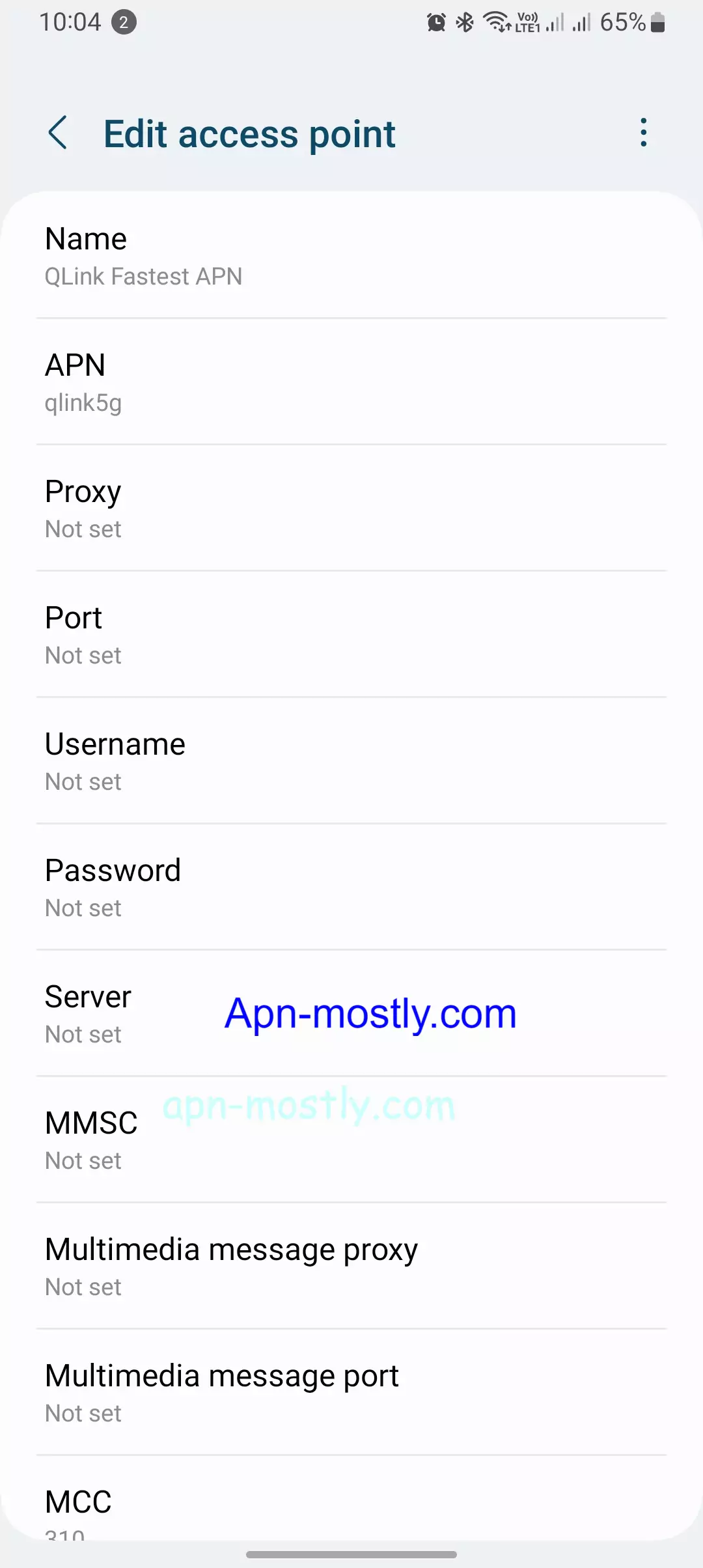
Q Link Wireless APN Settings for Android (2025 Updated)
If you use an Android device and Q Link internet isn’t working, follow these steps:
How to Configure Q Link APN on Android
1️⃣ Go to Settings → Mobile Networks → Access Point Names (APN)
2️⃣ Tap ‘+’ to add a new APN
3️⃣ Enter the following values:
| Field | Value |
|---|---|
| Name | Q Link Internet |
| APN | qlink |
| MMSC | http://wholesale.mmsmvno.com/mms/wapenc |
| MCC | 310 |
| MNC | 240 |
| APN Type | default,supl,mms |
| APN Protocol | IPv4/IPv6 |
| Bearer | LTE |
4️⃣ Save the APN → Select it → Restart your phone
5️⃣ Turn Airplane Mode ON & OFF to refresh network settings
💡 Pro Tip: If your internet is still slow, try switching APN Protocol to IPv4 only for a faster connection.
Q Link Wireless APN Settings for iPhone (iOS 17 & Below)
If data, MMS, or FaceTime isn’t working on your iPhone, follow these steps:
How to Set Up APN on iPhone
1️⃣ Go to Settings → Cellular → Cellular Data Network
2️⃣ Enter these values:
| Field | Value |
|---|---|
| APN | qlink |
| MMSC | http://wholesale.mmsmvno.com/mms/wapenc |
| MMS Max Message Size | 1048576 |
3️⃣ Tap Save → Restart your iPhone
How to Fix Q Link APN Not Working?
Even after applying the correct APN settings, some devices may still face no data, slow speeds, or MMS issues. Try these proven fixes:
1. Reset APN to Default
- Android: Settings > Mobile Networks > APN > Reset to Default
- iPhone: Settings > General > Reset > Reset Network Settings
2. Enable LTE/5G Mode
- Android: Settings > Mobile Networks > Preferred Network Type > Select LTE/5G
- iPhone: Settings > Cellular > Cellular Data Options > Enable 5G Auto
3. Change APN Protocol to IPv4
Some users report that switching APN Protocol to IPv4 only improves speed.
4. Force Network Reconnection
1️⃣ Turn ON Airplane Mode → Wait 30 seconds → Turn it OFF.
2️⃣ Reinsert SIM card → Restart the phone.
3️⃣ Dial *#*#4636#*#* on Android → Select Phone Info → Set LTE Preferred.
5. Check Your SIM Card
- Remove and clean your SIM card.
- If your SIM is damaged, order a replacement from Q Link Wireless.
Fastest APN for Q Link Wireless (Low Latency & High Speed)
If you experience lag while gaming or slow browsing, Q Link’s default APN settings may not be optimized for speed.
Best Q Link APN Settings for Faster Speeds
| Field | Value |
|---|---|
| APN Type | default,supl |
| APN Protocol | IPv4 only |
| Bearer | LTE |
💡 Pro Tip: If your connection is still slow, install Cloudflare’s 1.1.1.1 DNS app for lower ping and smoother performance.
How to Enable Hotspot & Tethering on Q Link
If you’ve tried enabling hotspot/tethering on Q Link Wireless, you might have seen this message:
“Hotspot feature is unavailable on your current plan.”
Here’s a tested workaround that unlocks hotspot sharing on Q Link:
How to Unlock Hotspot on Q Link
1️⃣ Go to APN settings on your device
2️⃣ Create a new APN
3️⃣ Enter these values:
| Field | Value |
|---|---|
| APN | qlink |
| APN Type | dun,default,supl,mms |
| Bearer | Unspecified |
4️⃣ Save & select this APN
5️⃣ Restart your phone
💡 Pro Tip: If the hotspot still won’t turn on, use a VPN like Psiphon Pro before activating the hotspot.
Q Link 5G APN Configuration
If your phone supports 5G but keeps switching to LTE, these settings can fix it:
| Field | Value |
|---|---|
| APN | qlink |
| APN Type | default,supl |
| APN Protocol | IPv4/IPv6 |
| Bearer | NR, LTE |
How to Lock Your Phone to 5G Mode
1️⃣ Dial *#*#4636#*#* on your phone
2️⃣ Tap Phone Info
3️⃣ Find ‘Preferred Network Type’
4️⃣ Set it to NR/LTE (5G Preferred)
💡 Pro Tip: If 5G keeps dropping, switch APN Protocol to IPv4 only.
User-Reported Fixes from Online Forums
🗨 u/TechSavvy21 (Reddit):
“Switching APN Type to ‘default,supl,mms’ fixed my Q Link LTE. Had no data before.”
🗨 JohnK (YouTube Comment):
“Disabling VoLTE and restarting made my Q Link LTE work instantly.”
🗨 Mike_B (X – Formerly Twitter):
“Toggling Airplane mode OFF/ON refreshed my connection. No need to reset APN.”
Final Thoughts
Setting up Q Link Wireless APN correctly ensures fast, stable mobile data and hotspot functionality. If your internet isn’t working, use the correct settings and apply the troubleshooting steps from this guide.
💡 Still having issues? Drop a comment below, and I’ll help you troubleshoot!